


Managing extensive music collections requires robust software that handles thousands of tracks efficiently. iTunes once dominated music library management, but many users now seek alternatives offering better features and flexibility. Modern music organization apps provide superior tagging, intuitive interfaces, and cross-platform compatibility.
This guide explores the best iTunes alternatives available in 2026 for organizing large music libraries. Whether you maintain 10,000 tracks or 100,000, these applications streamline music management while enhancing your listening experience.
Why Consider iTunes Alternatives in 2026
iTunes served music lovers well for decades but shows its age in 2026. The software feels bloated with features many users never utilize. Additionally, Apple discontinued iTunes on Mac in 2019, fragmenting its functionality across multiple apps.
Performance issues plague iTunes when managing libraries exceeding 20,000 tracks. Slow loading times, laggy searches, and frequent crashes frustrate users with extensive collections. Therefore, dedicated music management software often delivers smoother performance.
Cross-platform limitations restrict iTunes primarily to Apple ecosystems. Windows users receive fewer updates and limited functionality compared to Mac counterparts. Moreover, Linux users cannot run iTunes natively without workarounds.
Modern alternatives offer superior metadata editing, advanced search capabilities, and customizable interfaces. Many integrate with streaming services while managing local files. These features make contemporary apps more versatile than iTunes for serious music collectors.
MusicBee: The Free Powerhouse for Windows Users
MusicBee stands as the top free iTunes alternative for Windows in 2026. This lightweight application handles massive libraries exceeding 100,000 tracks without performance degradation. The interface remains highly customizable, allowing users to create personalized layouts.
Advanced tagging capabilities let users edit metadata across multiple files simultaneously. Auto-tagging features pull information from online databases, correcting incomplete or incorrect tags. Additionally, MusicBee supports virtually every audio format including FLAC, ALAC, and DSD files.
The built-in audio converter processes files between formats without external software. Users can create custom equalizer presets and apply DSP effects. Moreover, MusicBee includes podcast management and internet radio streaming.
Smart playlists automatically update based on user-defined criteria like genre, play count, or date added. The duplicate file finder identifies redundant tracks occupying storage space. However, MusicBee remains Windows-exclusive, limiting Mac and Linux users.
Sync capabilities allow transfer to Android and iOS devices, though not as seamlessly as iTunes. The software supports various plugins extending functionality further. Therefore, power users appreciate MusicBee’s extensive customization options.
Foobar2000: Minimalist Efficiency for Audiophiles
Foobar2000 takes a minimalist approach prioritizing audio quality and efficiency. This lightweight player consumes minimal system resources while delivering bit-perfect playback. Audiophiles appreciate its support for high-resolution audio formats and advanced output options.
The modular design allows users to install only desired components, keeping the interface clean. Extensive plugin ecosystem provides functionality ranging from spectrum analyzers to scrobbling. Additionally, appearance customization through skins creates personalized visual experiences.
Library management handles unlimited tracks with blazing-fast search and sorting. The media library database indexes files efficiently, enabling instant retrieval. Moreover, Foobar2000 excels at batch file operations and metadata editing.
Advanced users leverage powerful query syntax for complex searches and playlist generation. The ReplayGain function normalizes volume across tracks for consistent listening levels. However, the steep learning curve intimidates users seeking immediate simplicity.
Foobar2000 runs natively on Windows with third-party ports available for Mac and Linux. The completely free software receives regular updates from dedicated developers. Therefore, technical users willing to invest setup time gain unmatched control over their music libraries.
MediaMonkey: Comprehensive Organization Across Platforms
MediaMonkey delivers professional-grade music management for Windows and Android users. The Gold version unlocks advanced features like automatic organization and batch file renaming. Libraries scale to hundreds of thousands of tracks without noticeable slowdowns.
Automatic file organization sorts music into folder structures based on customizable rules. Users can standardize naming conventions across entire collections automatically. Additionally, the powerful tag editor fixes metadata inconsistencies efficiently.
Party mode locks the interface preventing accidental changes during social gatherings. Advanced search filters locate specific tracks instantly within massive libraries. Moreover, MediaMonkey syncs seamlessly with numerous portable devices including iPods and Android phones.
The built-in converter handles format conversions and quality adjustments. Users can create leveled playlists maintaining consistent volume across different recordings. However, the interface feels dated compared to newer alternatives despite functional excellence.
According to PCMag, MediaMonkey remains one of the most feature-rich music management applications available, particularly for users with extensive local music collections.
MediaMonkey’s free version provides substantial functionality, though the Gold upgrade adds worthwhile features. Cloud synchronization keeps libraries accessible across multiple devices. Therefore, users managing diverse collections across various platforms benefit significantly.
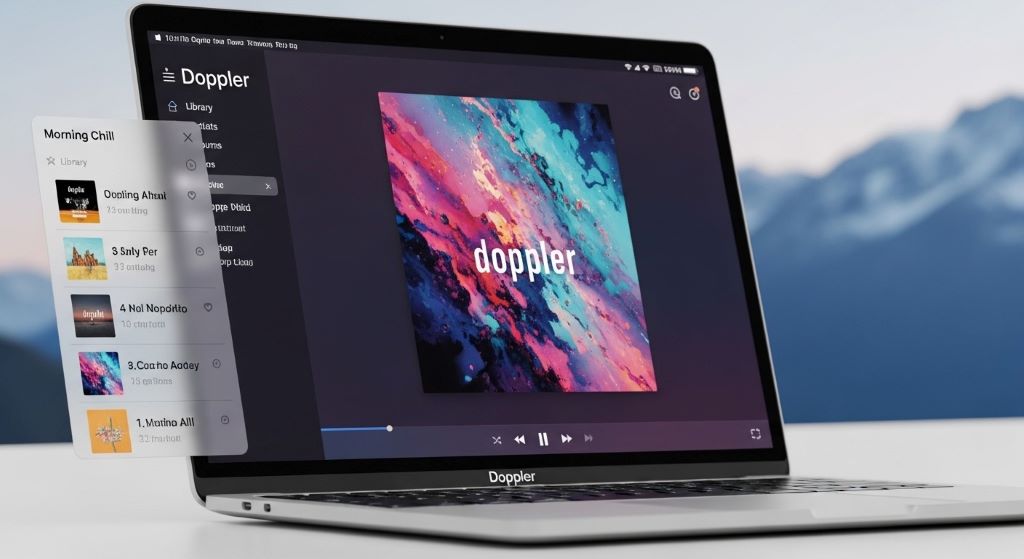
Doppler: Modern Elegance for Mac Users
Doppler brings contemporary design to Mac music library management. The native Apple Silicon application runs incredibly smoothly on modern Macs. Clean, intuitive interfaces make navigation effortless even in libraries containing thousands of albums.
Automatic album artwork fetching completes visual library presentation. Smart playlists update dynamically based on listening habits and metadata criteria. Additionally, Doppler integrates with Last.fm for scrobbling and music discovery.
The equalizer provides precise audio adjustments with genre-specific presets. Queue management allows on-the-fly playlist adjustments during listening sessions. Moreover, keyboard shortcuts enable efficient navigation without touching the mouse.
Library statistics reveal listening patterns, most-played tracks, and collection growth over time. The duplicate finder identifies redundant files based on various criteria. However, Doppler lacks some advanced features found in more complex alternatives.
The one-time purchase model avoids subscription fatigue affecting many modern apps. Regular updates add functionality while maintaining performance. Therefore, Mac users seeking elegant simplicity often choose Doppler over heavier alternatives.
Roon: Audiophile-Grade Management with Streaming Integration
Roon represents the premium tier of music library management. This subscription-based service combines local library organization with streaming integration. The sophisticated metadata database enriches collections with artist biographies, credits, and musical connections.
Multi-room audio support sends different music to various networked devices simultaneously. The signal path display shows exactly how audio processes before reaching speakers. Additionally, Roon’s DSP engine provides room correction and advanced filtering options.
Library organization emphasizes musical relationships, showing collaborations and influences between artists. The interface beautifully displays album artwork and supplementary information. Moreover, Roon integrates Tidal and Qobuz streaming alongside local files seamlessly.
Advanced tagging and focus features enable complex library searches and playlist generation. The software handles massive libraries exceeding 200,000 tracks with remarkable speed. However, the substantial subscription cost deters casual listeners.
Roon requires a dedicated core server for optimal performance with large libraries. Mobile apps control playback from phones and tablets elegantly. Therefore, serious audiophiles with significant budgets find Roon’s capabilities justify the investment.
Clementine: Cross-Platform Open Source Solution
Clementine provides free, open-source music management across Windows, Mac, and Linux. The lightweight application handles large libraries competently while maintaining fast performance. Interface simplicity appeals to users wanting straightforward organization without complexity.
Smart playlists automatically generate based on criteria like genre, year, or rating. The tag editor supports bulk operations across multiple files simultaneously. Additionally, Clementine integrates various internet radio services and streaming platforms.
Remote control via Android and iOS apps allows library access from mobile devices. Visualization plugins create animated displays synchronized with music playback. Moreover, the queue manager enables flexible playlist manipulation during listening sessions.
Audio transcoding converts files between formats when transferring to portable devices. The library scanner monitors folders for new additions automatically. However, development pace slowed recently compared to more actively maintained alternatives.
Cross-platform consistency ensures similar experiences across operating systems. Complete absence of subscription fees or purchase costs removes financial barriers. Therefore, budget-conscious users with moderate organizational needs often select Clementine.
Swinsian: Lightweight Mac Alternative
Swinsian offers Mac-specific music management without iTunes bloat. The native application launches instantly and responds immediately to user inputs. Library handling remains snappy even with collections approaching 100,000 tracks.
Advanced search and filtering locate specific tracks within seconds. The tag editor supports batch operations and pulls metadata from online databases. Additionally, Swinsian converts audio formats and adjusts quality settings efficiently.
Smart playlists automatically update based on customizable rules and criteria. Integration with Last.fm tracks listening habits and provides scrobbling. Moreover, the clean interface avoids overwhelming users with unnecessary features.
Folder watching automatically imports new files added to monitored directories. Duplicate detection identifies redundant tracks based on various matching criteria. However, fewer advanced features compared to comprehensive alternatives like MediaMonkey.
The one-time purchase provides lifetime updates at reasonable cost. System resource usage remains minimal even during intensive operations. Therefore, Mac users wanting lightweight efficiency without sacrificing essential features appreciate Swinsian.
Choosing the Right App for Your Library Size
Libraries under 5,000 tracks run smoothly on nearly any music management software. Simple solutions like Doppler or Clementine provide sufficient functionality. Additionally, free options eliminate financial considerations for smaller collections.
Medium-sized libraries between 5,000 and 25,000 tracks benefit from robust metadata editing. MusicBee and MediaMonkey excel at organizing diverse collections systematically. Moreover, these applications handle various audio formats without conversion needs.
Massive libraries exceeding 25,000 tracks require specialized software prioritizing performance. Foobar2000 and Roon handle enormous collections without slowdowns. However, user interface preferences and budget constraints influence final selection.
According to The Verge, maintaining local music libraries offers superior audio quality and permanent ownership compared to streaming-only approaches.
Essential Features for Large Library Management
Batch metadata editing saves countless hours when organizing extensive collections. The ability to edit tags across hundreds of files simultaneously proves invaluable. Additionally, auto-tagging from online databases corrects inconsistent information automatically.
Advanced search and filtering capabilities enable instant track location within massive libraries. Boolean operators and saved search queries streamline repeated operations. Moreover, duplicate detection prevents storage waste from redundant files.
Performance optimization ensures responsive interfaces regardless of library size. Database indexing accelerates searches and browsing operations significantly. Therefore, software architecture matters tremendously for large collection management.
Conclusion
Numerous capable iTunes alternatives exist in 2026 for organizing large music libraries effectively. MusicBee and MediaMonkey provide comprehensive free solutions for Windows users, while Doppler and Swinsian serve Mac enthusiasts elegantly. Foobar2000 delivers unmatched customization for technical users, whereas Roon offers premium experiences justifying subscription costs. Additionally, Clementine provides solid cross-platform functionality without financial barriers. The optimal choice depends on library size, operating system, budget, and desired features. Therefore, evaluating specific needs against each application’s strengths ensures selecting the perfect music management solution for your extensive collection.
Frequently Asked Questions
What is the best free alternative to iTunes for large music libraries?
MusicBee ranks as the best free iTunes alternative for Windows users with large libraries. It handles over 100,000 tracks smoothly while offering advanced tagging, format conversion, and customizable interfaces. However, Mac users should consider free options like Clementine instead.
Can these apps transfer music to iPhone like iTunes does?
Most iTunes alternatives cannot sync directly to iPhones due to Apple’s proprietary protocols. However, cloud storage services, third-party sync tools, or converting to streaming apps provide workarounds. MediaMonkey offers limited iOS sync capabilities through specific configurations.
Which music management app works best across Windows, Mac, and Linux?
Clementine provides the most consistent experience across Windows, Mac, and Linux platforms. This open-source application maintains similar functionality regardless of operating system. Additionally, Foobar2000 runs on all three platforms through various official and community ports.
Do I need to pay for music library management software?
Many excellent free options exist including MusicBee, Foobar2000, and Clementine. However, paid alternatives like MediaMonkey Gold, Doppler, and Roon offer advanced features justifying costs for serious collectors. Therefore, budget and feature requirements determine whether paid software proves worthwhile.
How do these apps handle high-resolution audio files?
Most modern iTunes alternatives support high-resolution formats like FLAC, ALAC, and DSD files. Foobar2000 and Roon particularly excel at audiophile-grade playback with bit-perfect output. Additionally, many apps include built-in converters for format compatibility across devices.
Related Topics:
Offline Map App Without Data Usage: Your Ultimate Guide
Overcoming Drone Control App Telemetry Signal Loss: A Pilot’s Tale




