

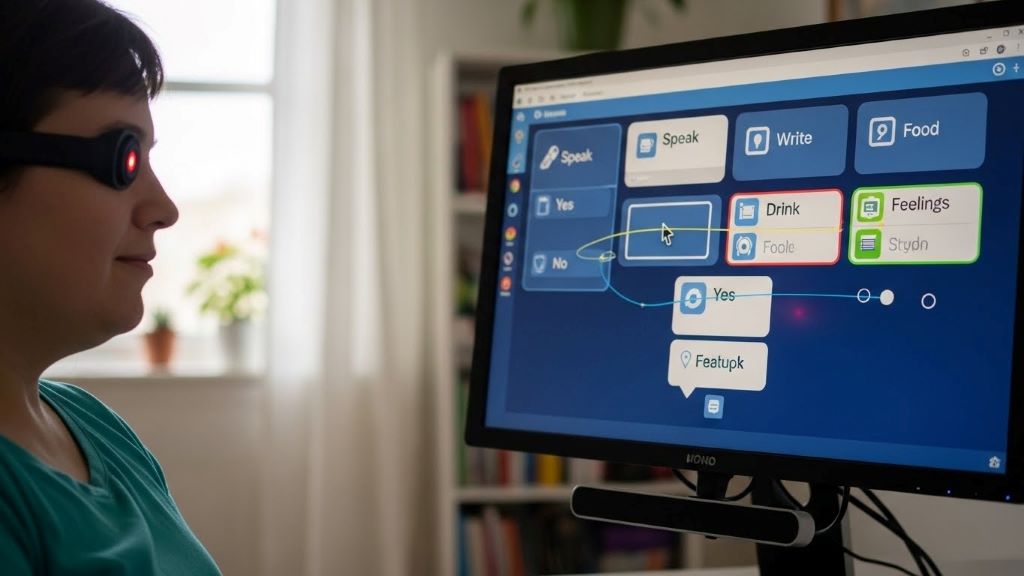
Assistive technology transforms lives by breaking down barriers for people with disabilities. These innovative tools enable independence, enhance communication, and open doors to education and employment. Today’s high tech solutions are more advanced and accessible than ever before.
Understanding Assistive Technology
Assistive technology includes any device, software, or equipment that helps people with disabilities perform tasks more easily. These tools range from simple magnifiers to sophisticated computer systems. Technology continues to evolve, making daily activities more manageable for millions worldwide.
The goal of assistive technology is universal accessibility. This means creating environments where everyone can participate fully, regardless of their abilities. Moreover, these technologies often benefit people beyond their intended users, demonstrating the principle of universal design.
The Growing Need for Accessible Technology
Over one billion people worldwide live with some form of disability. This number continues to grow as populations age. Therefore, the demand for effective assistive solutions increases each year.
Many people face multiple barriers in their daily lives. Physical disabilities, visual impairments, hearing loss, and cognitive challenges all create unique obstacles. However, technology provides innovative answers to these challenges. According to CNN, assistive technology is becoming more sophisticated and integrated into mainstream products.
Additionally, workplace accessibility remains a critical issue. Employers increasingly recognize that assistive technology helps retain talented employees. These tools create equal opportunities and support diverse workforces.
Vision Assistive Technologies
People with visual impairments benefit tremendously from modern technology. Screen readers convert text to speech, allowing users to navigate computers and smartphones independently. Popular screen readers include JAWS, NVDA, and built-in options like Apple’s VoiceOver.
Smart glasses represent another breakthrough in vision assistance. These devices use cameras and artificial intelligence to describe surroundings, read text aloud, and recognize faces. Some models even provide real-time navigation guidance through audio cues.
Refreshable braille displays connect to computers and mobile devices. These tactile devices translate on-screen text into braille characters that users can read with their fingers. Consequently, blind users can access digital content directly through touch.
Electronic magnifiers help people with low vision. These devices enlarge text and images significantly while maintaining clarity. Modern versions are portable, lightweight, and connect wirelessly to various displays.
Mobile apps now offer powerful vision assistance. Applications can identify objects, colors, currency, and even light levels. Many of these apps use artificial intelligence to provide accurate, instant information through audio feedback.
Hearing Assistive Technologies
Hearing aids have evolved dramatically with digital technology. Modern devices connect wirelessly to smartphones, televisions, and other audio sources. Users can adjust settings through apps and stream audio directly to their hearing aids.
Cochlear implants provide solutions for severe hearing loss. These surgically implanted devices bypass damaged parts of the ear and directly stimulate the auditory nerve. Advanced processing technology continues to improve sound quality and speech understanding.
Real-time captioning services transcribe speech instantly. These systems use artificial intelligence and speech recognition to create accurate captions for conversations, meetings, and presentations. Therefore, deaf and hard-of-hearing individuals can participate fully in various settings.
Video relay services enable sign language users to make phone calls. Professional interpreters facilitate communication between sign language users and hearing individuals through video connections. This technology makes telephone communication accessible to the deaf community.
Alerting devices notify users of important sounds through visual or tactile signals. These systems can detect doorbells, fire alarms, crying babies, and other critical sounds. Flashing lights or vibrating accessories ensure users never miss important alerts.
Mobility Assistive Technologies
Powered wheelchairs incorporate sophisticated control systems. Users can operate these chairs through joysticks, head controls, or even eye-gaze technology. Some advanced models can climb stairs, elevate users to standing height, or navigate rough terrain.
Exoskeletons represent cutting-edge mobility assistance. These robotic devices support or replace limb function, enabling people with paralysis to walk. While still developing, exoskeletons show tremendous promise for rehabilitation and daily mobility.
Smart prosthetics use sensors and microprocessors to mimic natural limb movement. Modern prosthetic limbs can respond to muscle signals, providing intuitive control. Some versions even provide sensory feedback, allowing users to feel texture and pressure.
Environmental control systems let users operate lights, doors, thermostats, and appliances through various interfaces. Voice commands, switch controls, or smartphone apps provide independence in managing home environments. Consequently, people with limited mobility can control their surroundings without physical interaction.
Standing frames and transfer devices help people move safely between positions. Powered options reduce caregiver strain while promoting user independence. These devices support better health outcomes through improved circulation and bone density.

Communication Assistive Technologies
Speech-generating devices give voice to people who cannot speak. These devices range from simple button-based systems to sophisticated eye-gaze computers. Users select words, phrases, or symbols to generate synthesized speech.
Augmentative and alternative communication apps transform tablets into powerful communication tools. Many apps offer customizable vocabularies, predictive text, and natural-sounding voices. Additionally, some systems learn user preferences to speed up communication over time.
Text-to-speech software converts written words into spoken language. This technology helps people with speech difficulties communicate through typing. Modern versions offer multiple languages and realistic voice options.
Communication boards provide low-tech alternatives for expressing needs and ideas. Digital versions on tablets combine portability with extensive vocabulary options. These tools work effectively even in environments where high-tech solutions fail.
Brain-computer interfaces represent the frontier of communication technology. These systems allow users to control computers directly through brain signals. While still emerging, this technology offers hope for people with severe physical disabilities.
Cognitive Assistive Technologies
Memory aids help people with cognitive challenges stay organized and independent. Digital reminder systems send alerts for medications, appointments, and daily tasks. GPS tracking devices provide peace of mind for caregivers while supporting user independence.
Text simplification tools make complex content more accessible. These applications reduce reading difficulty by simplifying vocabulary and sentence structure. Therefore, people with learning disabilities or cognitive impairments can access more information independently.
Time management apps provide visual schedules and countdown timers. These tools help users understand time passage and stay on task. Many apps use pictures alongside text to enhance comprehension.
Reading assistance software offers multiple supports for comprehension. Features include text-to-speech, highlighting, dictionary definitions, and visual formatting adjustments. Students with dyslexia and other reading challenges benefit significantly from these tools.
Focus and attention apps minimize distractions while supporting task completion. Some applications block distracting websites or provide structured work intervals. Others offer calming background sounds or visual timers to maintain concentration.
Educational Assistive Technologies
Digital textbooks offer features impossible with print versions. Students can adjust text size, change background colors, and access built-in dictionaries. Text-to-speech functionality supports students with reading difficulties or visual impairments.
Note-taking apps with recording capabilities help students capture lectures effectively. These apps can sync audio recordings with typed notes, allowing students to review specific portions easily. Some versions even transcribe recordings automatically.
Math software provides scaffolding for students with learning disabilities. These programs offer step-by-step guidance, visual representations, and instant feedback. Consequently, students can practice independently while building confidence.
Writing assistance tools support students throughout the composition process. Grammar checkers, word prediction, and organizational templates reduce frustration. Some applications even provide feedback on writing clarity and structure.
Virtual reality creates immersive learning experiences for all students. However, VR proves especially valuable for students with autism or social anxiety. Safe virtual environments allow practice of real-world skills without overwhelming sensory input.
Workplace Assistive Technologies
Ergonomic input devices reduce strain and prevent injuries. Alternative keyboards, vertical mice, and voice recognition software accommodate various physical needs. These tools help employees work comfortably and productively.
Document accessibility tools ensure everyone can access workplace information. Software can convert documents to accessible formats, add alternative text to images, and check for accessibility compliance. According to Forbes, workplace accessibility technology creates competitive advantages for companies.
Video conferencing platforms now include robust accessibility features. Live captioning, screen reader compatibility, and keyboard navigation make virtual meetings inclusive. Additionally, recording features allow employees to review meetings at their own pace.
Task management software with customizable interfaces helps employees with various cognitive styles. Visual boards, list views, and calendar integrations accommodate different organizational preferences. Notification systems ensure important deadlines receive attention.
Remote work technology expands employment opportunities for people with disabilities. Home-based work eliminates transportation barriers and allows for personalized workspace accommodations. Cloud-based systems ensure seamless collaboration regardless of location.
Emerging Technologies and Future Directions
Artificial intelligence drives many recent accessibility advances. Machine learning improves speech recognition, image description, and predictive text accuracy. These improvements make assistive technology more intuitive and responsive.
Internet of Things devices create smarter, more accessible homes. Connected appliances, lighting, and security systems respond to voice commands or automated routines. This connectivity promotes independence for people with various disabilities.
Wearable technology monitors health and provides discrete assistance. Smartwatches can detect falls, remind users about medications, and even predict seizures. These devices offer security while maintaining user dignity.
5G networks enable faster, more reliable assistive technology. Improved connectivity supports real-time captioning, video relay services, and remote assistance. Moreover, reduced latency makes communication through assistive devices more natural.
Haptic feedback technology creates tactile experiences in digital environments. This advancement benefits blind users navigating virtual spaces and deaf users feeling sound vibrations. Multisensory interfaces make technology accessible in new ways.
Overcoming Barriers to Access
Cost remains a significant barrier to assistive technology adoption. Many devices are expensive and poorly covered by insurance. However, various funding programs, grants, and nonprofit organizations help bridge this gap.
Technology abandonment occurs when devices fail to meet user needs. Proper assessment, training, and ongoing support reduce abandonment rates. Therefore, involving users throughout the selection process proves critical.
Awareness of available technologies limits adoption. Many people with disabilities remain unaware of helpful tools. Increased education for healthcare providers, educators, and employers can improve technology awareness and utilization.
Compatibility issues between different systems create frustration. Industry standards for accessibility and interoperability help address these challenges. Collaborative development between companies ensures technologies work together seamlessly.
Social stigma sometimes prevents people from using visible assistive devices. However, mainstream adoption of accessibility features normalizes these tools. When everyone benefits from accessibility, stigma decreases naturally.
Conclusion
High tech assistive technology continues revolutionizing universal accessibility. From vision and hearing aids to mobility devices and communication tools, these innovations empower people with disabilities to live independently and participate fully in society. Emerging technologies like artificial intelligence and wearable devices promise even greater accessibility in the future. While barriers like cost and awareness remain, ongoing advocacy and technological advancement steadily create a more inclusive world. By embracing assistive technology and universal design principles, we build communities where everyone can thrive regardless of their abilities.
Frequently Asked Questions
What is the difference between assistive technology and universal design?
Assistive technology refers to specific devices or software designed to help people with disabilities. Universal design creates products and environments usable by everyone without adaptation. However, both concepts work together to promote accessibility and inclusion.
How much does assistive technology typically cost?
Assistive technology costs vary widely from free smartphone apps to devices costing thousands of dollars. Basic tools like screen readers and magnifiers may be free or low-cost. Complex devices like powered wheelchairs or cochlear implants require significant investment, though insurance and funding programs often help.
Can assistive technology help children with learning disabilities?
Yes, assistive technology significantly benefits children with learning disabilities. Tools like text-to-speech software, graphic organizers, and audiobooks support reading comprehension. Additionally, speech-to-text programs and specialized apps help with writing and math skills.
Where can I get assessed for assistive technology needs?
Occupational therapists, assistive technology specialists, and rehabilitation centers provide comprehensive assessments. Schools often conduct evaluations for students with disabilities. Additionally, many assistive technology vendors offer consultations to match users with appropriate devices.
Does insurance cover assistive technology devices?
Insurance coverage for assistive technology varies by policy and device type. Medicare and Medicaid cover certain devices deemed medically necessary. Private insurance may cover some assistive technology with proper documentation. Many organizations offer grants or financial assistance for uncovered items.
Related Topics:
The Pitfalls of Bad Data Visualization Examples with Data
SolidJS vs React: Unraveling Performance Benchmarks in Web Development




